 fyllyo
Runs on your Mac · nothing is uploaded
Automatically fill PDF forms from your documents.
Fyllyo’s AI reads your documents and fills the PDF for you, 100% locally on your Mac. AI form filling is $99 once, with no subscription. Every other PDF tool is free.
59 forms · 2,432 fields filled · 19 s median per form · all on your Mac. See every recorded run

“My goal is to bring intelligence to your device, rather than have you pay for tokens.”Arun, founder · arun@fyllyo.com
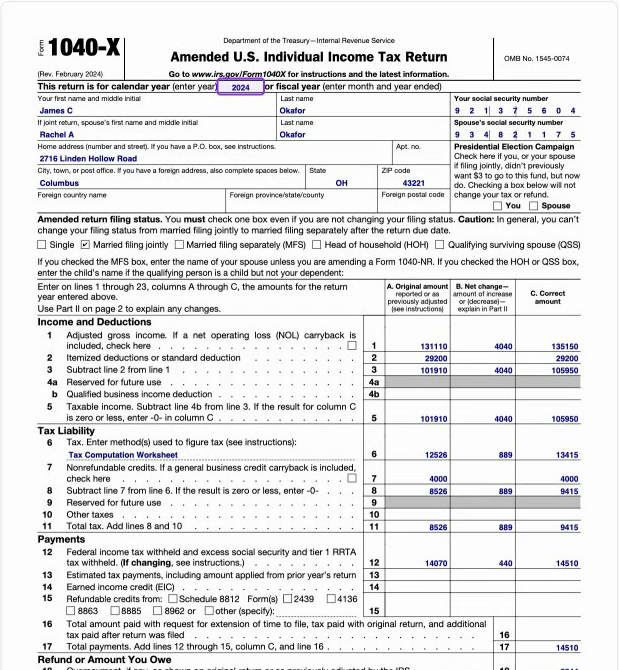
DoneForm 1040-X (Oct 2026 run): 39 fields in 23.0 s, nothing flagged
Form 1040-X · amended return
Read the demo walkthrough
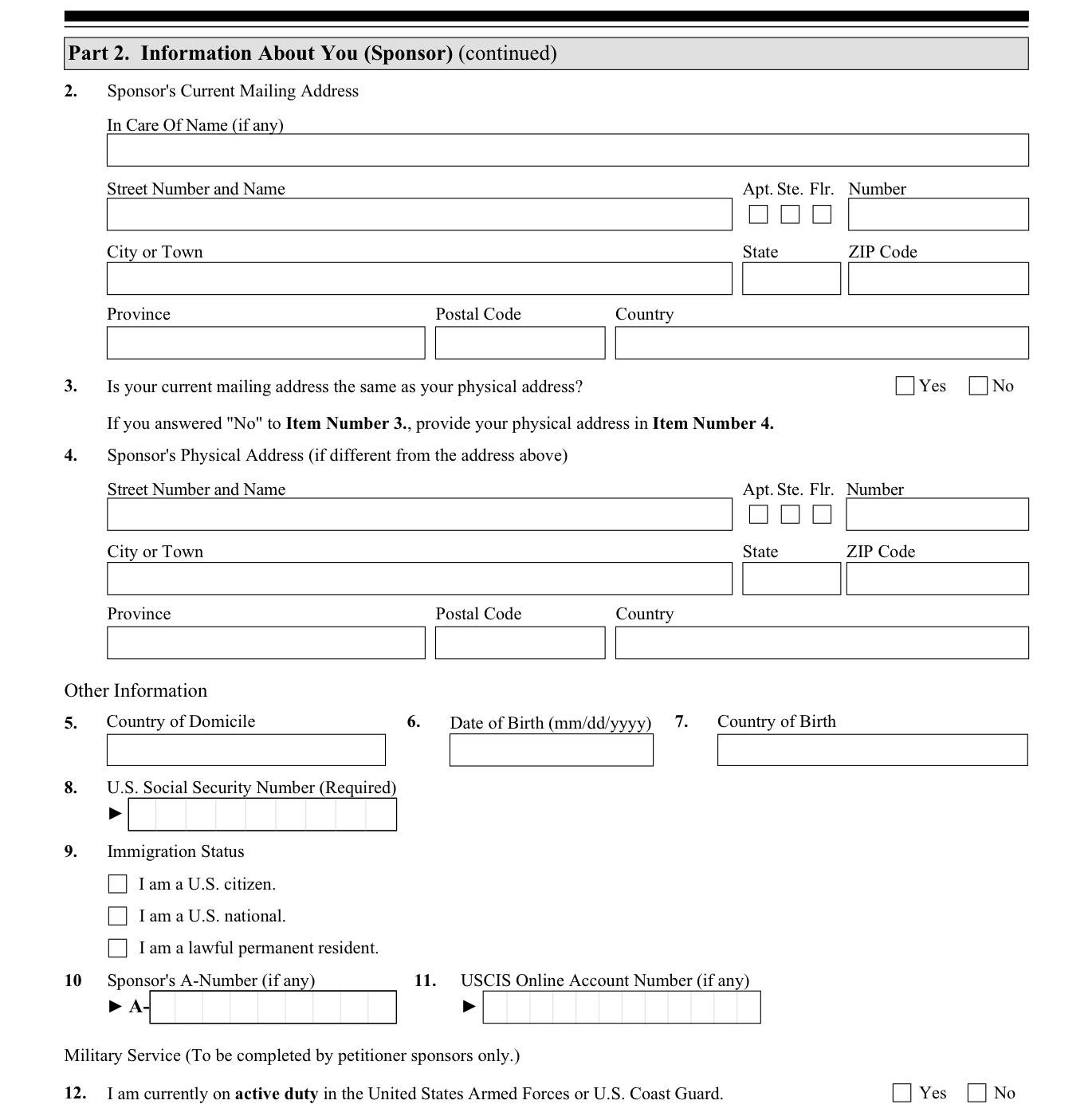
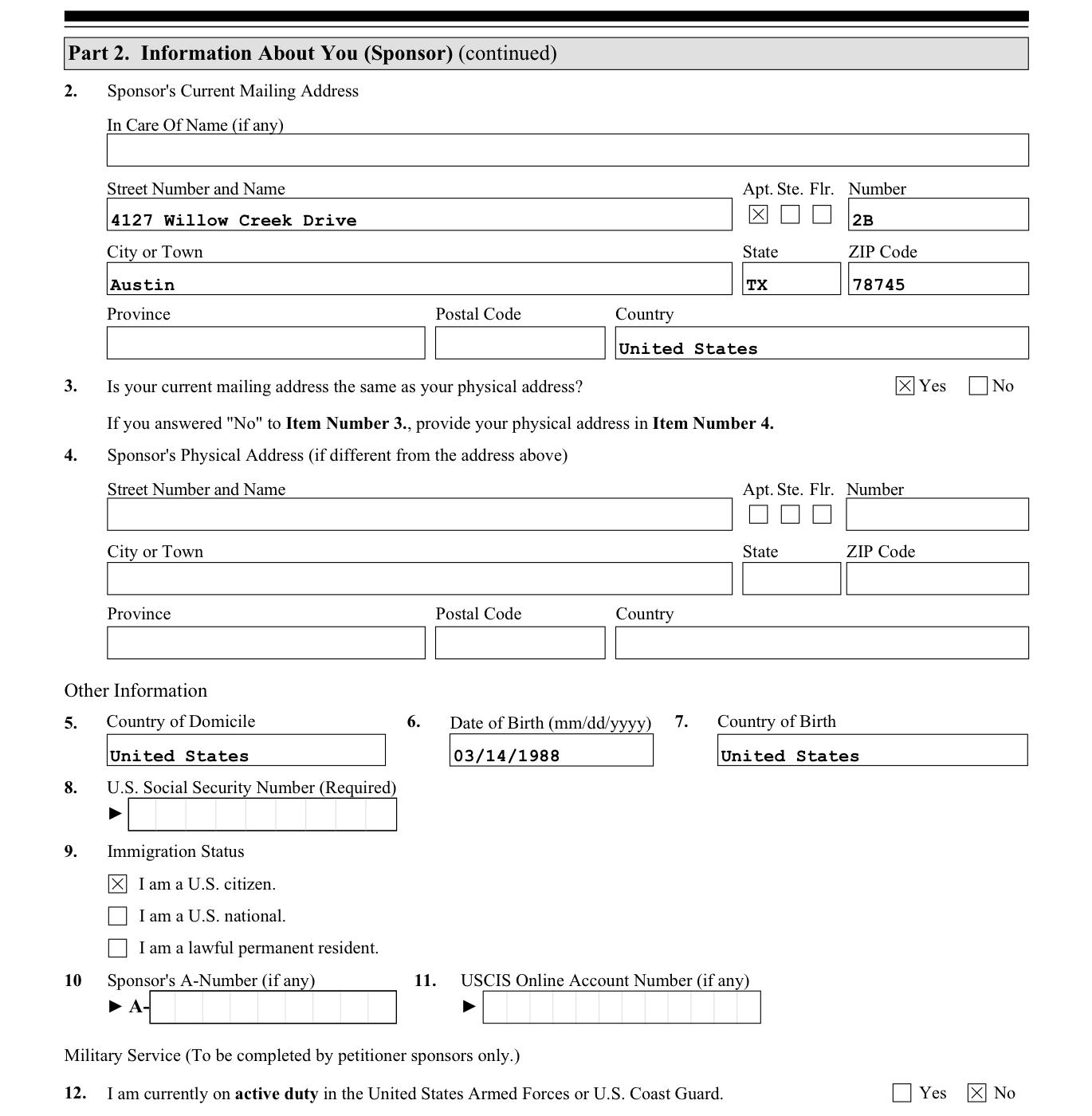
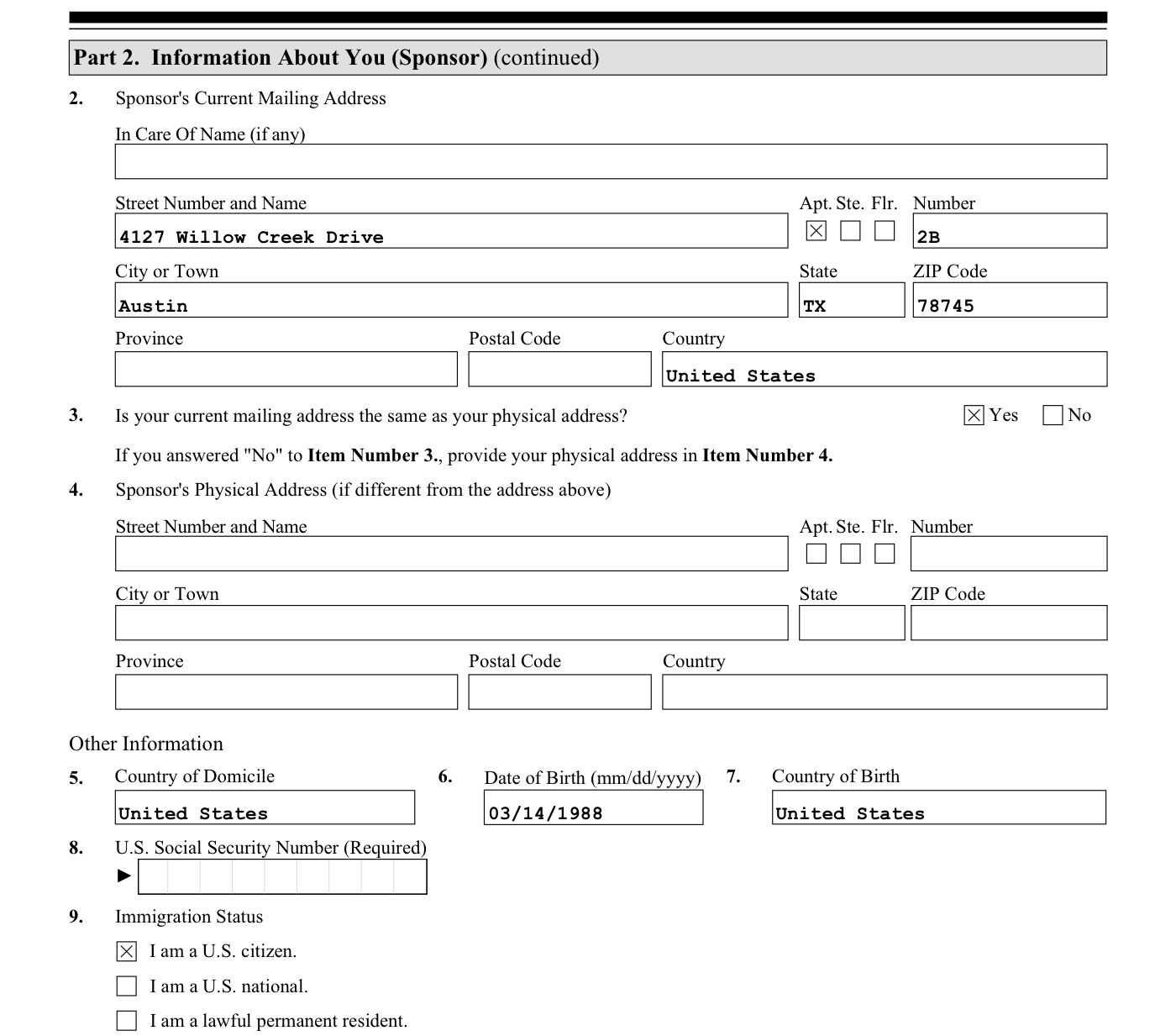
- Copy: “Country of domicile: United States” (fyllyo-test-client-i864.txt · lines 25, 35) → Country and country of domicile, as written
- Split: “4127 Willow Creek Drive, Apt 2B Austin, TX 78745” (fyllyo-test-client-i864.txt · lines 33–34) → One address into six boxes
- Reformat: “Date of birth: March 14, 1988” (fyllyo-test-client-i864.txt · line 23) → March 14, 1988 → 03/14/1988
- Extract: “Place of birth: San Antonio, Texas, United States” (fyllyo-test-client-i864.txt · line 24) → San Antonio, Texas, United States → United States
- Infer: “Mailing address (same as physical address) · Citizenship: U.S. citizen · Military: not on active duty” (fyllyo-test-client-i864.txt · lines 29, 30, 32) → Three boxes ticked from plain sentences
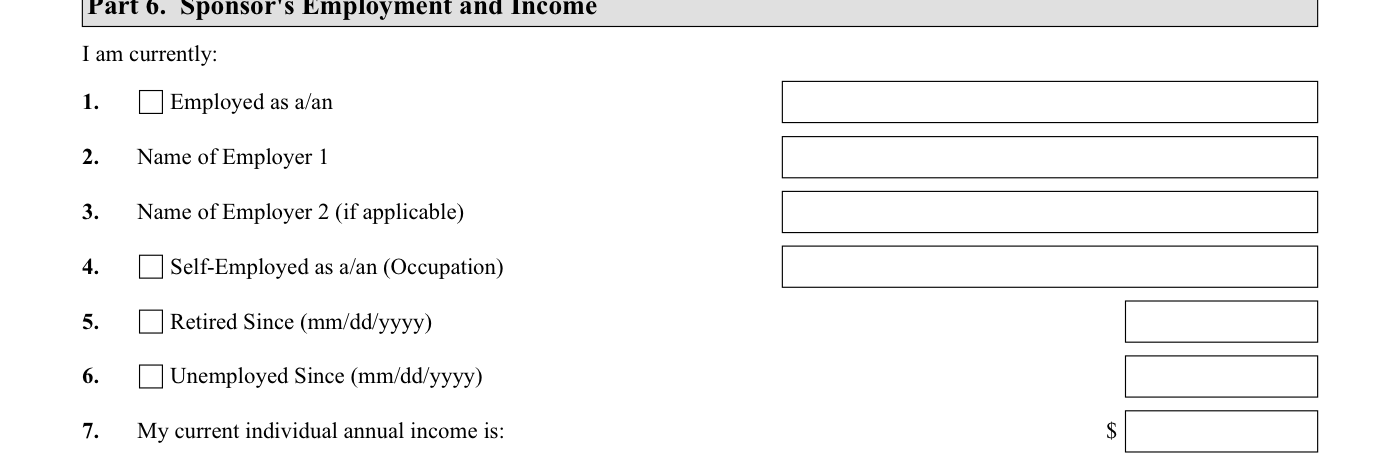
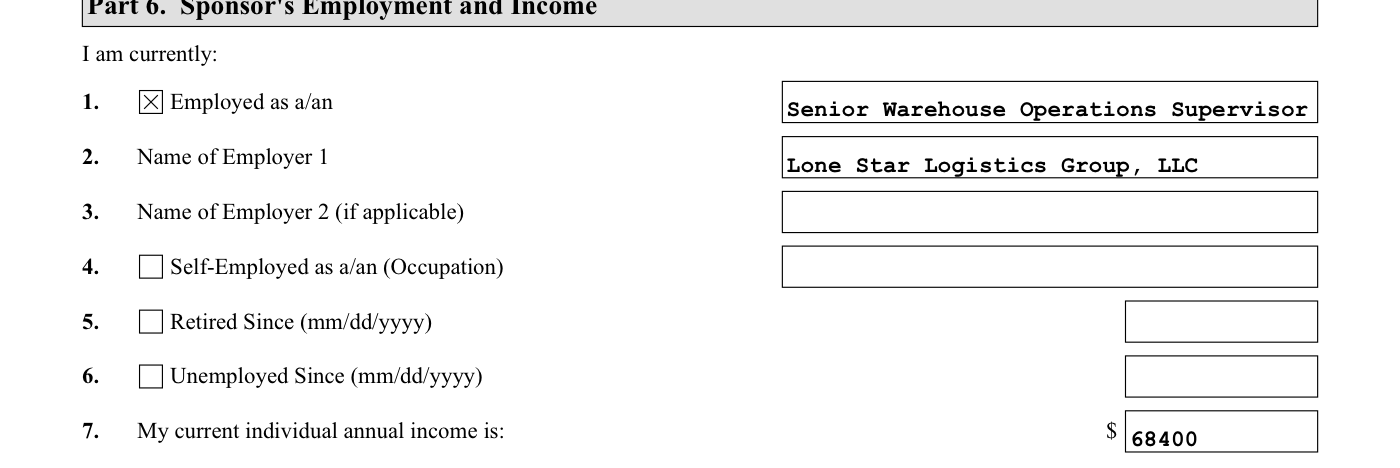
- Copy: “Daniel is employed full time. Employer: Lone Star Logistics Group, LLC Occupation: Senior Warehouse Operations Supervisor” (fyllyo-test-client-i864.txt · lines 78–80) → Employed, occupation and employer
- Choose: “Current annual salary: $68,400 (per the employer letter dated September 10, 2026; paid $2,630.77 every two weeks)” (fyllyo-test-client-i864.txt · lines 83–84) → $68,400 a year, not the $2,630.77 paycheck
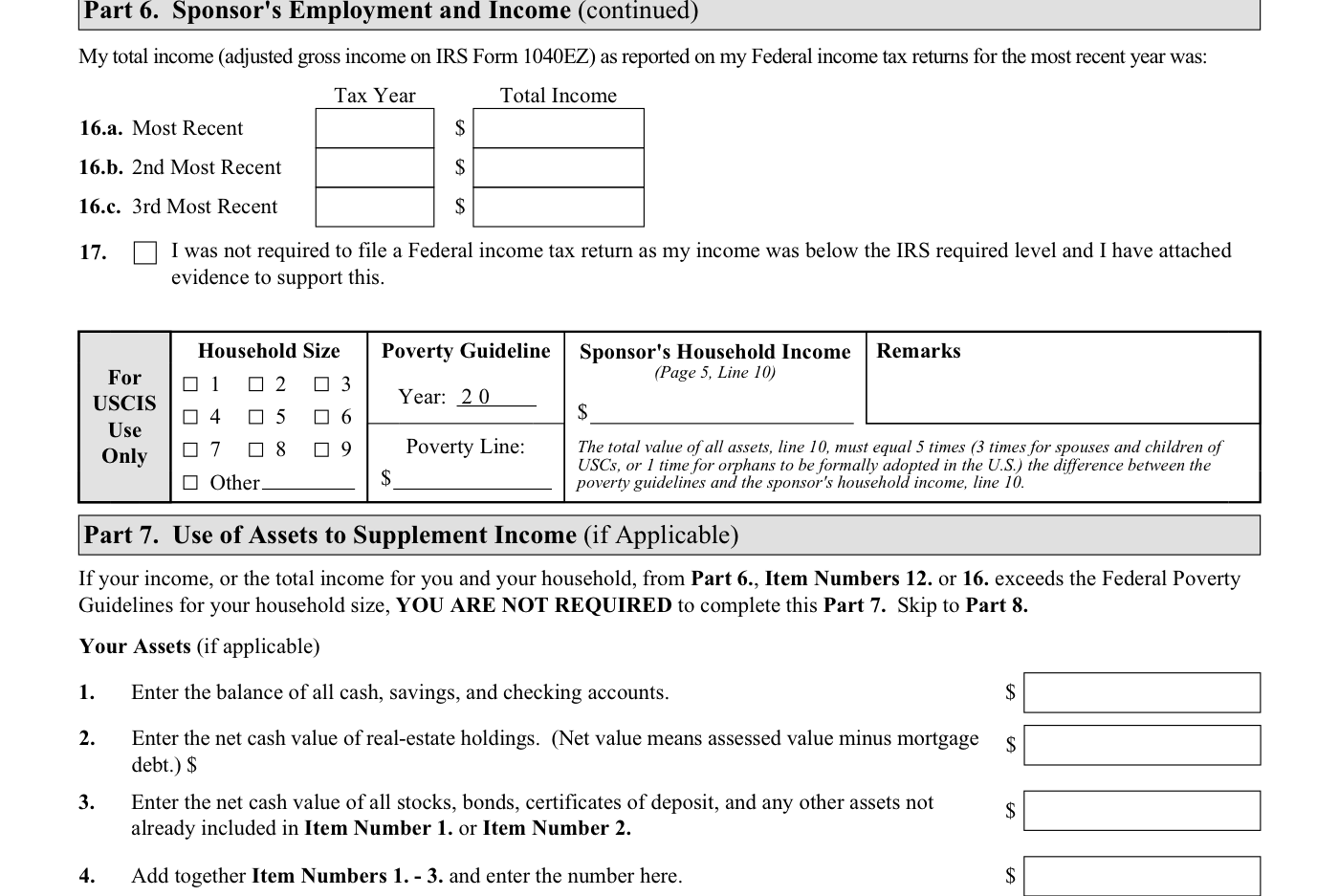
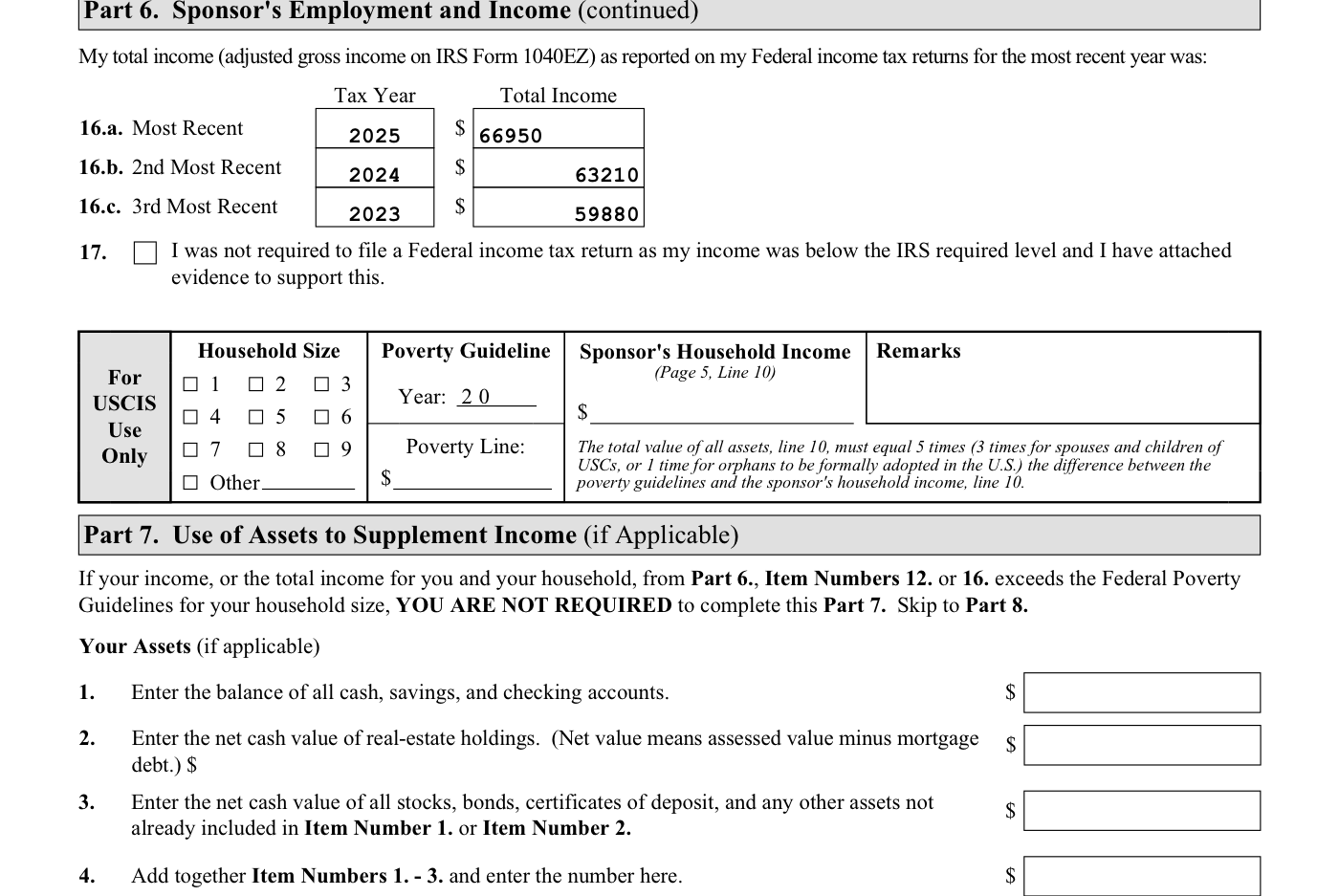
- Table: “Tax year 2025: total income $66,950 Tax year 2024: total income $63,210 Tax year 2023: total income $59,880” (fyllyo-test-client-i864.txt · lines 92–94) → Three tax years, newest first
- Leave blank: “Daniel's income is enough on its own, so he is not relying on assets.” (fyllyo-test-client-i864.txt · line 101) → Part 7 left empty, since no assets are needed
- Done: Form I-864: Form I-864 (Sep 2026 run): 60 fields in 18.6 s
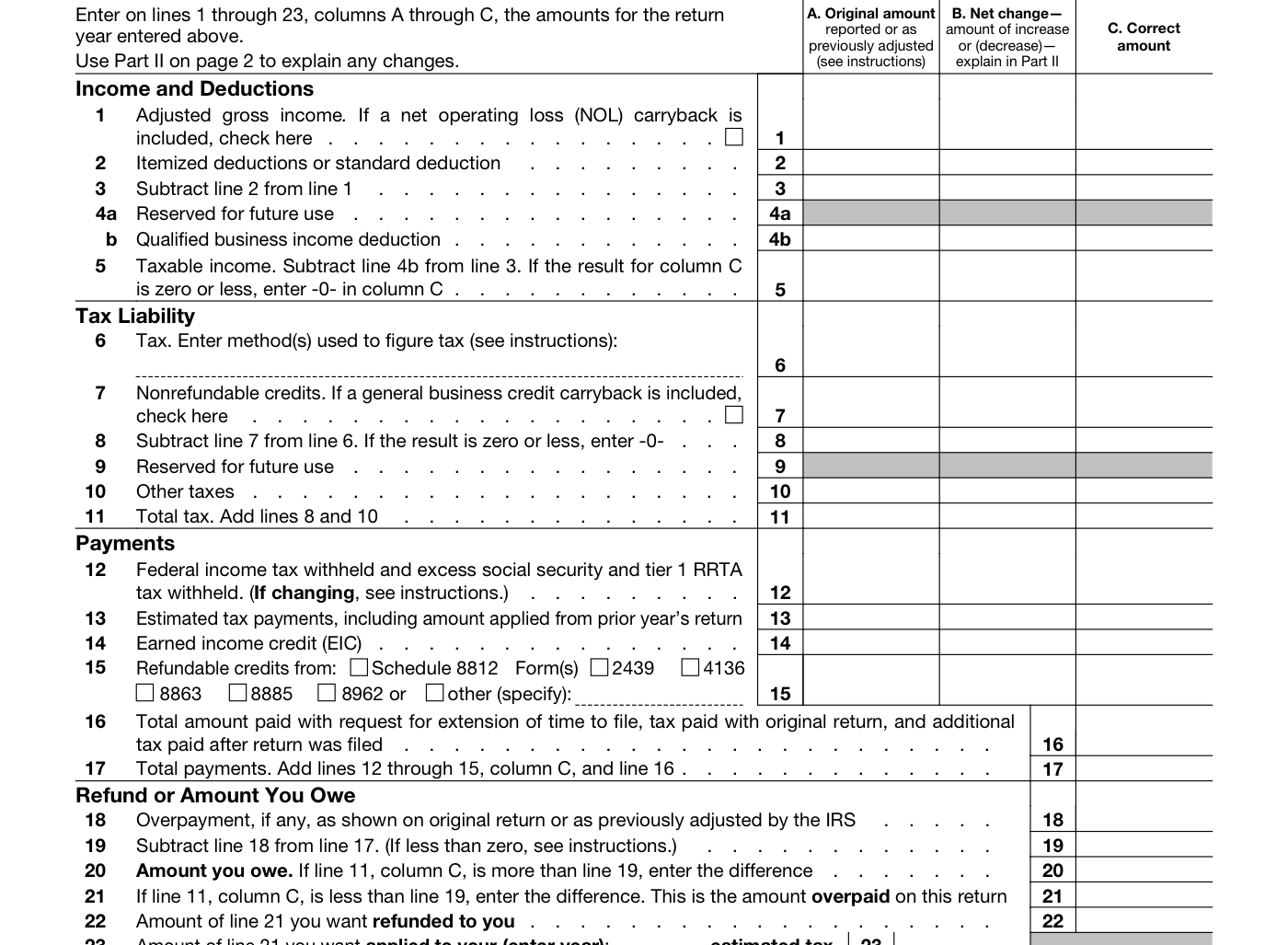
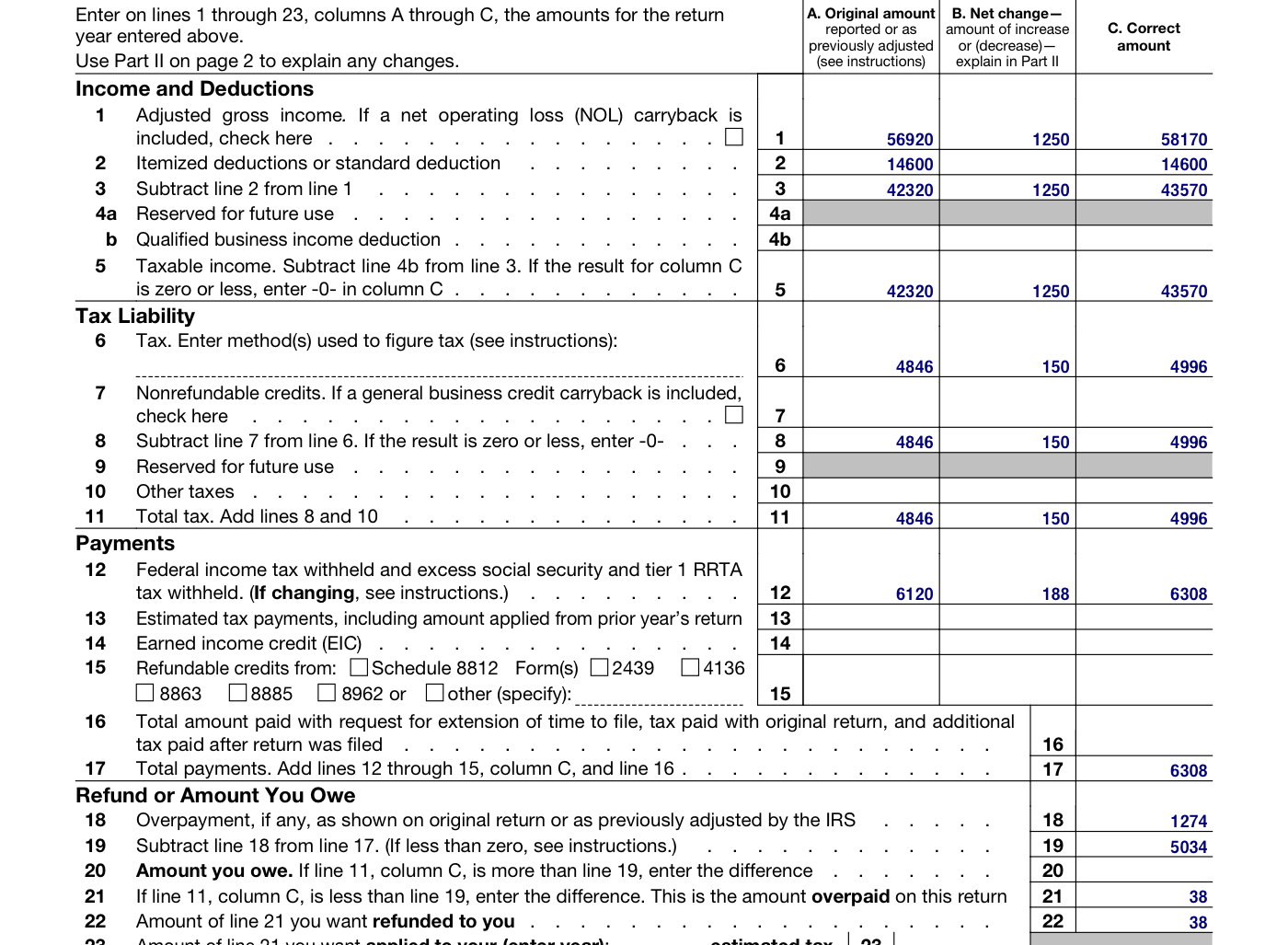
- Copy: “Line 11 Adjusted gross income 56,920.00 · Line 12 14,600.00 · Line 16 4,846.00 · Line 25d 6,120.00 …” (2024_original_return.txt · lines 10–18) → Column A from the original return
- Calculate: “my wages are $1,250.40 higher ($58,170.40 instead of $56,920.00)” (client_email.txt · line 8) → 56,920 + 1,250.40 = 58,170.40 → 58,170
- Carry down: “Line 12 Standard deduction 14,600.00” (2024_original_return.txt · line 11) → 58,170.40 − 14,600 = 43,570.40 → 43,570
- Copy: “My tax software recomputed my 2024 tax as $4,996, up $150 from the $4,846 on the original” (client_email.txt · line 11) → Tax of 4,996, up 150 from the original
- Round: “2 Federal income tax withheld | 6,120.00 | 6,307.55” (w2c_northshore_freight.txt · line 9) → 6,307.55 → 6,308 · 187.55 → 188
- Calculate: “Line 34 Overpayment 1,274.00” (2024_original_return.txt · line 17) → 6,307.55 − 1,274 − 4,996 = 37.55 → refund 38
- Done: Form 1040-X: Form 1040-X (Oct 2026 run): 39 fields in 23.0 s, nothing flagged
Recorded runs from September and October 2026. Fyllyo fills an I-864 and an amended 1040-X on a Mac. See how it works, step by step
Pick a form and drop in your documents: PDFs, scans, photos, Word files or notes. Fyllyo finds what the form needs, does the math, formats each answer and fills the fields. You review before saving. How Fyllyo’s AI fills a form
01AI form filling
Bring your own PDF form. Fyllyo learns how to fill it.
Start with any blank fillable PDF. Fyllyo works out its fields, calculations, rules and formats, so you set it up once and reuse it.
Your form isn’t in any library? Add it. Setup sends only the blank form and your instructions to Fyllyo Cloud. Filling happens on your Mac.
Add your own form- Add the blank PDFAny fillable form works. Instructions are optional.
- Fyllyo learns itIt works out the fields, calculations and rules, then tests itself on test clients and fixes what it gets wrong.
- Fill it from documentsReuse it for every new set of documents, 100% on your Mac.
Fills sponsor and applicant details from passports, letters and pay stubs. Keeps the two people apart and turns monthly pay into annual income.
- Form I-864Affidavit of Support Under INA
- Form DS-11Application for a U.S. Passport
- Form DS-82U.S. Passport Renewal Application
- Form DS-5507Affidavit of Physical Presence
Compares the original return with corrected documents, carries each figure to its line, and flags lines it can’t support.
- Form 1040-XAmended U.S. Individual Income Tax Return
- Form 941-XAdjusted Employer's Quarterly Federal Tax Return or Claim for Refund
- Form 941Employer’s Quarterly Federal Tax Return
- Form 1040U.S. Individual Income Tax Return
Fills case details from your documents into New York RJIs, summonses and motions, Florida family law forms and more.
- Application in Support of an Order to Show CauseU.S. Bankruptcy Court, Eastern District of New York
- Form 12.901(b)(3)Petition for Dissolution of Marriage
- Form CIV-GP-124Notice of Motion (NYC Civil Court)
- Form EAffidavit of Personal Service (NYS Office of State Review)
- Form UCS-840Request for Judicial Intervention
- Form UCS-840ARequest for Judicial Intervention Addendum
Fills claims and requests from client documents, such as CMS-1500, CMS-L564, CMS-1763, SSA-44 and SSA-455.
- Form CMS L564Request for Employment Info
- Form CMS-1500Health Insurance Claim Form
- Form CMS-1763Request for Termination of Medicare Coverage
- Form SSA-44Medicare Income-Related Monthly Adjustment Amount - Life-Changing Event
- Form SSA-455Disability Update Report
Fills onboarding and compliance forms from your records, such as I-9, MCS-150, WH-380-E, SF-15 and ACORD 25.
- ACORD 25Certificate of Liability Insurance
- Form 69-001Industrial Hemp Registration Application for Growers (California)
- Form I-9Employment Eligibility Verification
- Form MCS-150Motor Carrier Identification Report (Application for USDOT Number)
- Form SF-15Application for 10-Point Veteran Preference
- Form WH-380-ECertification of Health Care Provider
Reads your documents
Use PDFs, scans, photos, Word files and typed notes, including several files for one form.
Handles the calculations
Turns monthly pay into annual income and carries figures from one line to the next.
Fits the form
Formats dates and addresses, separates details into the right boxes, and applies the form’s conditions.
Never guesses quietly
When it isn’t sure, it leaves the field empty and tells you why: two documents disagree, or a number is in the wrong box.
Shows its sources
Follow an answer back to the line in your documents it came from.
Fast, on your Mac
Most forms fill in about 19 seconds in recorded test-client runs.
Or start with a form we’ve already prepared.
Choose from 63 built-in forms for immigration, tax, court, benefits and business paperwork. They’re ready to fill, with no custom setup.
- Form DS-11
- Form DS-5507
- Form I-130
- Form I-140
- Form I-508
- Form I-864
- Form 941-X
- Form 1040
- Form 1099-C
- Form 1099-K
- Form 1099-OID
- Form 1099-Q
- Form 1120-S
- Form 4868
- Form 5498
- Form 8288
- Form 8889
- Form 8960
- Form W-4
- Schedule 1 (Form 1040)
- W-9
- Form 12.901(b)(3)
- Form E
- Form UCS-840A
- General Form 1
- Notice of Confidential Information within Court Filing
- Form CMS L564
- Form CMS-1763
- Form SSA-455
- Form 69-001
- Form MCS-150
- Form WH-380-E
02Free PDF tools
Your PDF tools. All free.
Edit, redact, sign, protect and organize PDFs on your Mac, with no account. All PDF tools
Read the recording transcript
A scanned receipt is just a picture. So search finds nothing. Recognize text, right on this Mac. Now search, select and copy all work. Save it, and the text stays in the file.
Search a scan. Make a scanned receipt searchable, then find and copy its text. Free, no account. How to search a scan
03Your documents
Your documents stay on your Mac.
Your documents and the filled PDFs never leave your Mac. Here’s exactly what runs where.
- Source documents
- Processed on your Mac, not uploaded
- Text recognition
- Runs on your Mac using Apple’s text recognition
- AI form filling
- Local AI model, downloaded once
- Offline filling
- Works after the model and form are set up
- Free PDF tools
- No account required
- Custom-form setup
- Sends only the blank PDF and your instructions
04Recorded results
Proof from recorded runs.
Measured in recorded runs on a Mac and in the tests behind every release. Every recorded run
- 19secondsmedian per form, across 59 forms filled in recorded test-client runs
- 864real PDFschecked in five PDF engines before every release
- 0source-document bytes uploadedAI form filling runs on your Mac
05One-time purchase
AI form filling. $99 once.
No subscription and no charge per form, so filling more never costs more. Free updates.
Three-year cost at unchanged rates, before tax. Acrobat Pro: $19.99/month, annual plan billed monthly, from Adobe’s pricing page, checked October 21, 2026. The $20/month subscription is an illustrative example. Plans include different features.
PDF TOOLS
$0Every PDF tool included
- Read, search, print and annotate
- Type into forms and add signatures
- Edit text and redact sensitive details
- Sign with a certificate
- Combine, split and organize pages
- Recognize text in scans
- Password protection and hidden-data cleanup
- Compress PDFs and use supported XFA forms
AI FORM FILLING
$99once · lifetime licence · one Mac at a time · free updates
- Automatically fill PDF forms from supporting documents
- Calculations and formatting for the form
- Each answer linked to its source
- Built-in forms, plus your own configured PDFs
- Unsure answers left for you, with the reason why
Custom-form setup is charged separately. Filling on your Mac uses no credits.
Compare Fyllyo, Acrobat Pro and Preview. Need licences for a team? Talk to me.
06The person behind Fyllyo
Built after one too many visa forms.
I got into this filling in my own visa and travel forms: the same details, typed into form after form. What kept me going is the question underneath it. Can a model running on your own Mac finally do this, without sending anyone’s documents to a cloud?
Tell me which form slows you down, or what you’d like Fyllyo to do next.
arun@fyllyo.com07Questions
Before you download.
Something else? Email arun@fyllyo.com.
Can Fyllyo automatically fill PDF forms from my documents?
Yes. Add your supporting documents and choose a built-in or configured form. Fyllyo’s AI reads the documents and fills the PDF fields on your Mac, including supported calculations and formatting. Review the answers against their sources before saving.
What is free, and what does $99 buy?
Every PDF tool is free, including editing, redaction, signing, compression and typing into forms yourself. AI form filling from supporting documents costs $99 once. That buys a lifetime licence for one Mac at a time, with free updates. There’s no subscription and no charge per fill. Custom-form setup is charged separately.
Are my documents uploaded?
Your source documents and completed PDFs stay on your Mac. Custom-form setup sends only the blank PDF and any optional instructions to Fyllyo Cloud.
How is this different from Mac AutoFill or Acrobat’s autofill?
AutoFill reuses the few details you saved, like your name and address. Fyllyo reads the client’s actual documents (returns, pay stubs, passports, letters) and fills every field the form needs. It does the math and shows the source of each answer.
What Mac do I need?
An Apple silicon Mac, M1 or later, with macOS 13 Ventura or later. AI form filling works best with 16 GB of memory. Its AI model and scan support download when your trial or licence starts.
Runs on your Mac · nothing is uploaded
Let AI fill the PDF. Keep your documents local.
APPLE SILICON · MACOS 13 OR LATER